


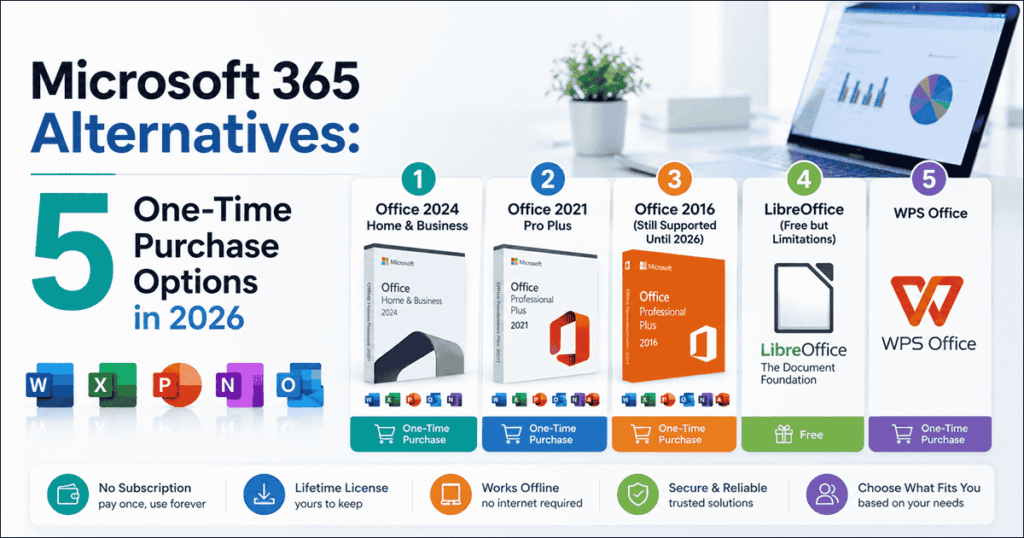
Paying $99.99–$150 per year for Microsoft 365 adds up fast – over five years, that’s $500–$750 for software you never actually own. A one time purchase office license lets you pay once and keep using the microsoft office suite for years without recurring fees. Below are five practical microsoft 365 alternatives worth considering in 2026, from the latest Office 2024 to free options like LibreOffice.
Why People Are Moving Away from M365
The shift away from Microsoft 365 subscriptions comes down to cost, control and necessity.
- Recurring costs add up. Microsoft 365 Personal runs $69.99/year; Family costs $99.99/year; business plans reach $12.50/month per user. Over 3–5 years, these subscriptions often exceed the price of a perpetual license for the same office apps.
- Paywalled features most users don’t need. Cloud-based AI assistants, real-time collaboration tools and advanced compliance features are bundled into subscription tiers. Many users only need Microsoft Word, Excel and PowerPoint for standard document editing – features fully available in one-time purchase versions.
- Internet dependency. Microsoft 365 requires constant connectivity for cloud sync, activation checks and feature updates. Perpetual licenses let you edit documents offline without restrictions.
- Privacy and data concerns. Cloud-based productivity suites store documents on external servers, with telemetry and data collection built in. Users in regulated industries – or anyone who prefers local data control – benefit from keeping files off Microsoft’s cloud.
- Ownership preference. A one time purchase office license gives you permanent access. For small business owners, freelancers and personal users on fixed budgets, paying once simply makes more sense.
Option 1: Office 2024 Home & Business
Office 2024 Home & Business is the newest perpetual microsoft office suite, released in 2024 with a one-time purchase price of approximately $249.99.
It includes Word 2024, Excel 2024, PowerPoint 2024, OneNote and Outlook – covering every essential office app plus commercial use rights. The Home edition (without Outlook) retails around $149.99.
New features over Office 2021 include Fluent Design improvements, better crash recovery in Word, new Excel functions, enhanced Outlook meeting tools and updated OneNote inking. It’s compatible with Windows 10, Windows 11 and recent macOS versions, with support from Microsoft through October 9, 2029.
This is the best microsoft office alternative for users who want the newest features, a lifetime license guarantee and the longest remaining support window – roughly 3+ years of security updates from mid-2026. Learn more in our Office 2024 Home and Business productivity guide.
Limitations: No ongoing feature updates, no AI-powered tools from Microsoft 365, and cloud collaboration tools are limited compared to the subscription version.
Option 2: Office 2021 Pro Plus
Office 2021 Professional Plus is a proven, feature-complete office suite that includes Word, Excel, PowerPoint, Outlook, OneNote, Access and Publisher – making it ideal for business users who need the full set of desktop apps.
Pricing is typically lower than Office 2024, especially through trusted resellers offering genuine licenses. This makes it a more affordable option for small teams needing professional-grade business apps without subscription costs.
However, Office 2021 reaches end of support on October 13, 2026. After that date, Microsoft stops releasing security patches. If you’re buying in mid-2026, that leaves a narrow support window – important to consider for compliance-sensitive environments.
Best for: Businesses wanting Access and Publisher alongside core ms office files, users comfortable with a shorter remaining support lifecycle, and anyone prioritizing affordability over having the newest features.
Option 3: Office 2016 (Still Supported Until 2026)
Office 2016 remains the most budget-friendly microsoft office option with all essential applications – Word, Excel, PowerPoint, Outlook and OneNote.
Microsoft officially ended extended support for Office 2016 on October 14, 2025. The apps still function – you can open, create and edit documents – but no new security updates are being issued. For a deeper look at what this means in practice, see our piece on why Office 2016 was still a solid choice in 2025.
There’s an additional concern: Microsoft has begun blocking or disabling functionality in older perpetual versions through certificate expirations. Office 2019 for Mac, for instance, lost editing capability after July 2026 due to expired certificates – similar disruptions could affect Office 2016 users.
Best for: Users with tight budgets, entirely offline workflows and basic document creation needs. Understand the security trade-offs before committing.
Option 4: LibreOffice (Free but Limitations)
LibreOffice is a completely free alternative to microsoft office, developed by The Document Foundation as an open-source productivity suite. It includes Writer (word processor), Calc (spreadsheet application), Impress (presentation program), Draw, Base and Math.
LibreOffice supports over 110 languages and is available on Windows, Mac and Linux – making it particularly valuable for linux users who have no access to Microsoft Office. It’s forever free with no licensing costs. LibreOffice supports Microsoft Office formats like DOCX and XLSX, though formatting may break with complex documents containing advanced layouts, embedded objects or macros. FreeOffice is another option that is fully compatible with Microsoft Word, Excel, and PowerPoint formats. Apache OpenOffice is a classic open-source office suite for offline use as well, though it receives fewer updates.
The open source nature means no telemetry, full data sovereignty and complete local control. However, cloud integration and collaboration tools are limited – there’s no built-in real-time co-authoring comparable to Google Workspace or Microsoft 365. Google Workspace allows real-time collaboration on documents and remains a leading cloud-native suite for collaboration, though it requires a subscription.
Best for: Budget-conscious users, students, nonprofits and anyone comfortable with occasional formatting issues when sharing excel files or complex documents with Microsoft Office users.
Option 5: WPS Office
WPS Office is a lightweight office suite with a familiar Microsoft Office interface, available across Windows, Mac, Android devices and iOS. WPS Office offers a free tier with Writer, Presentation, and Spreadsheets – making it accessible without upfront cost.
Its standout strength is PDF handling: editing text, images and links, merging, splitting, annotating, OCR and conversion between PDF and Word/Excel/PowerPoint formats. WPS Office offers 1GB of free cloud storage for users and is lightweight and compatible with microsoft file formats. WPS Office offers high compatibility with Microsoft Office, though macros and advanced Excel formulas may cause issues.
The free version is ad-supported with limited features. Premium plans cost approximately $69.99/year for full PDF editing, e-signatures, 20 GB cloud storage and ad removal. Note that WPS Office does not offer a true one-time purchase – it operates on a subscription or freemium model.
Polaris Office supports editing across multiple devices and file formats, offering another cross-platform option. Only Office is compatible with Microsoft file formats .docx, .xlsx, and .pptx, and OnlyOffice allows up to 20 connections in its free Community Edition, with options for local or self-hosted deployment for document management. Zoho Workplace is a cost-effective suite for small to medium-sized businesses, supporting unlimited organizations and private chat channels. Apple iWork offers free cloud versions of productivity applications for Mac users. Lark centralizes team communication with document creation and messaging features as another alternative worth exploring.
Best for: Users prioritizing mobile apps, cross-platform access and strong PDF capabilities. Less suitable for businesses requiring genuine perpetual Microsoft licensing.
Comparison Table
| Feature | Office 2024 H&B | Office 2021 Pro Plus | Office 2016 | LibreOffice | WPS Office |
|---|---|---|---|---|---|
| One-Time Cost | ~$249.99 | Lower (varies) | Budget pricing | Free | Free (Premium ~$69.99/yr) |
| Annual Equivalent | ~$65–70/yr | Varies by remaining support | N/A (unsupported) | $0 | $0–$69.99/yr |
| Core Apps | Word, Excel, PPT, Outlook | Word, Excel, PPT, Outlook, Access, Publisher | Word, Excel, PPT, Outlook | Writer, Calc, Impress, Draw, Base | Writer, Spreadsheets, Presentation |
| Support End Date | Oct 9, 2029 | Oct 13, 2026 | Ended Oct 14, 2025 | Community-driven (ongoing) | Subscription-dependent |
| Platform Support | Windows 10/11, macOS | Windows, macOS | Windows, macOS | Windows, Mac, Linux | Windows, Mac, Linux, Android, iOS |
| MS Format Compatibility | Native | Native | Native | Good (some formatting issues) | Good (some formatting issues) |
| Cloud/AI Features | Limited | Limited | None | None built-in | Basic (premium adds more) |
| Licensing Model | Perpetual (one-time purchase) | Perpetual (one-time purchase) | Perpetual (one-time purchase) | Open source (free) | Freemium / Subscription |
Which Should You Choose?
Choosing the right microsoft office alternative depends on three factors: budget, feature requirements and how long you need the software to remain supported.
- Choose Office 2024 Home & Business if you want the latest Microsoft features with a one-time purchase and the longest support window through 2029. See current pricing and availability.
- Choose Office 2021 Pro Plus if you need Access, Publisher and a proven, feature-complete productivity suite at a lower price – but plan around the October 2026 support deadline. Browse genuine Office licenses.
- Choose Office 2016 only if budget is your primary concern and you understand the security risks of running unsupported software.
- Choose LibreOffice for a completely free, open-source solution – ideal when you don’t need perfect Microsoft format fidelity or built-in collaboration tools.
- Choose WPS Office for modern mobile versions, cross-platform access and advanced PDF tools – keeping in mind it’s subscription-based for premium features.
For most users buying in 2026, Office 2024 Home & Business offers the best balance of cost, features and remaining support. If you’re unsure where to buy Microsoft Office with a genuine license, start with a trusted reseller that provides lifetime key guarantees and clear activation support.
Frequently Asked Questions
Can I still get lifetime Microsoft Office licenses in 2026?
Yes. Office 2024 perpetual licenses are available as one-time purchases. Office 2021 licenses are still sold but reach end of support on October 13, 2026. Office LTSC 2024 is also available for commercial and regulated environments.
Will Office 2016 stop working after support ends?
The applications still run – you can open and edit documents. However, Microsoft no longer issues security or bug updates. Unpatched vulnerabilities create risk, and certificate expirations may disable editing functionality in some cases, as already happened with Office 2019 for Mac.
How do one-time purchase Office versions compare to Microsoft 365 subscriptions?
Subscriptions provide continuous feature updates, cloud collaboration, AI tools and technical support. One-time purchases offer a fixed feature set, lower total cost over time and no recurring payments – but support ends at a set date and new features aren’t added.
Are these alternatives compatible with Microsoft 365 cloud features?
Partially. Perpetual Office versions can use OneDrive for basic file storage, but advanced cloud-only features like real-time co-authoring in Teams are unavailable. LibreOffice and WPS Office have limited or no integration with Microsoft’s cloud services.
What happens to my documents if I switch between different Office alternatives?
Basic documents in standard file formats (.docx, .xlsx, .pptx) transfer well between other office suites. However, complex documents with macros, advanced formatting, conditional formatting or embedded objects may lose fidelity. Always test critical files before committing to a full switch.
Do these options include technical support and updates?
Microsoft perpetual versions receive security and bug updates until their end-of-support date – no feature updates. After that date, support ends entirely. LibreOffice relies on community forums and optional commercial support. WPS Office provides premium support depending on your subscription plan.
Discover more from Indigo Software
Subscribe to get the latest posts sent to your email.


