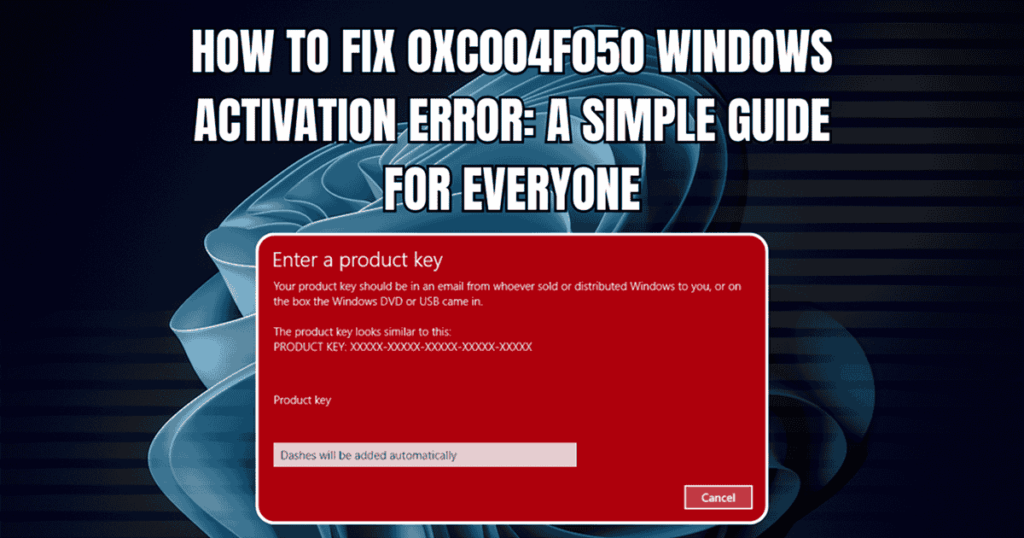
How to Fix Windows Activation Error 0xC004F050

how to fix windows activation error 0xc004f050

Few things are more frustrating than entering a product key and watching Windows reject it. This guide is for anyone encountering Windows activation error 0xC004F050, whether you’re upgrading, reinstalling, or troubleshooting a new PC. Error 0xC004F050 is one of the most common activation roadblocks on Windows 10 and Windows 11, and it doesn’t always mean what you think. This guide walks you through every fix-from a 30-second settings check to advanced command-line tools-so you can activate Windows and get back to work.

What Error 0xC004F050 Means & Quick Fix Checklist

Windows activation error code 0xC004F050 translates to a simple message from Microsoft’s Software Protection Service: “The product key is invalid.” It typically appears when you enter a product key during the activation process, attempt a Home to Pro upgrade, or try to reactivate after reinstalling Windows on new hardware.

A product key is a unique code that activates a specific edition of Windows. Each product key is valid for a specific Windows edition (such as Home or Pro), and using a key for a different edition will cause activation errors like 0xC004F050. A Windows edition refers to the specific version of Windows installed on your device, such as Windows 10 Home, Windows 10 Pro, or Windows 11 Pro. The validity of a product key is directly tied to the edition it is meant for if you try to activate a different edition with a mismatched key, you will encounter errors like 0xC004F050.

The error does not automatically mean your key is fake or useless. It often points to a mismatch between the edition installed on your PC and the edition your key supports, a temporary issue with Microsoft’s activation servers, or an incorrect product key entry.

Before diving into deeper troubleshooting, run through this quick first-aid checklist:

  • Verify your internet connection is stable (try plugging in an ethernet cable if Wi-Fi is unreliable).
  • Check which Windows edition is installed-Home, Pro, or Education.
  • Confirm the key was typed correctly (watch for common misreads like O vs. 0).
  • Sign in with the microsoft account that holds your digital license.
  • Restart your computer and retry activation once.

This guide covers both Windows 10 and Windows 11. Where the steps differ, we’ll call it out. At Indigo Software, we’re a genuine Windows license specialist-a veteran- and family-owned business based in Texas-and we help customers resolve activation issues with real, traceable keys. If you’re working with a non-genuine or reused key from a marketplace, you may ultimately need a new license, which we’ll address later.

Main Causes of Windows Activation Error 0xC004F050

Identifying the root cause is the fastest path to a fix. Here are the most common reasons error 0xC004F050 appears:

  • Edition mismatch – Using a product key for a different Windows edition causes errors. For example, a pro key won’t activate a Home installation.
  • Incorrect key entry – A single wrong character will trigger the error.
  • Key already in use – Product keys can only be used on one active installation at a time.
  • Blocked or invalid key – Microsoft may block keys that are over-used, stolen, or sourced from unauthorized channels.
  • Significant hardware changes – Replacing your motherboard or making other major component swaps requires reactivation of Windows, and often triggers this error code.
  • Activation server delays – Windows activation servers can be busy, causing errors even with a valid key. Waiting a few hours and retrying often resolves this.
  • Generic key confusionGeneric keys and pro upgrade paths behave differently from full retail keys. Confusing these is a frequent source of error 0xC004F050.
  • Volume-license keys – These might not be meant for standard retail use and will fail on consumer editions.

In the next sections we’ll walk through step-by-step fixes for each scenario, starting with the fastest options inside Windows Settings.

Run the Windows Activation Troubleshooter (Windows 10 & Windows 11)

Microsoft’s built-in Activation troubleshooter can automatically activate and resolve many error code 0xC004F050 issues-especially those caused by hardware changes or edition confusion. Old or corrupted cache can also block activation, and the troubleshooter clears this during its scan. Keep in mind that activation servers can experience delays after purchasing a key, so give it a moment.

On Windows 11:

  1. Click the Windows logo on your taskbar, then open Settings > System > Activation.
  2. If Windows isn’t activated, click Troubleshoot.
  3. The tool will scan your system, compare the digital license associated with your microsoft account, and attempt to reactivate.

On Windows 10:

  1. Select Start > Settings > Update & Security > Activation.
  2. Click Troubleshoot.
  3. Follow the on-screen prompts.

You can also verify your installed edition at Settings > System > Activation to confirm Windows knows which version you’re running.

Make sure you’re signed in with the same microsoft account you used when you first activated or purchased Windows. Without it, the troubleshooter can’t locate your digital license.

After the troubleshooter completes, restart your device and check whether error 0xC004F050 still appears before moving on. If you need a walkthrough on entering keys, see our guide on how to activate Windows 10 with a CD key.

Check Your Windows Edition vs. Your Product Key

Each product key is valid for a specific Windows edition. A Windows 10 Pro key will not activate a machine running Windows 10 Home, and a pro upgrade key won’t work on a fresh install of Pro. This edition mismatch is one of the single most common causes of error 0xC004F050.

How to verify your edition:

StepWindows 11Windows 10
1Settings > System > AboutSettings > System > About
2Scroll to “Windows specifications”Scroll to “Windows specifications”
3Look for “Edition” (Home, Pro, etc.)Look for “Edition” (Home, Pro, etc.)

Now compare that edition with what’s listed on your product key invoice or order email. Common labels include “Windows 11 Pro Retail,” “Windows 10 Pro Volume,” or “Home to Pro Upgrade.” If they don’t match, activation will fail until you either change the edition installed or use the correct key.

Not sure whether you have a Home or Pro key? Our comparison of Windows 11 Pro vs Home can help clarify the differences. Indigo Software customers can also contact our support team with their order number-we’ll confirm which edition your key covers.

Fix Home to Pro Upgrade Errors (Including Pro Upgrade Error 0xC004F050)

This section is specifically for users trying to upgrade from Windows 10 or Windows 11 Home to Pro and hitting the pro upgrade error: “We can’t activate Windows on this device because you don’t have a valid digital license or product key. Error code: 0xC004F050.”

The proven method many IT professionals use is the “generic key first, then your purchased key” approach. Using a generic key can help resolve error 0xC004F050 by forcing the edition switch before you apply your real license.

Steps for Windows 10:

  1. Disconnect from the internet temporarily (disable Wi-Fi or unplug the ethernet cable).
  2. Go to Settings > Update & Security > Activation.
  3. Click Change product key.
  4. Enter the official generic key: VK7JG-NPHTM-C97JM-9MPGT-3V66T (also written as vk7jg nphtm c97jm 9mpgt / nphtm c97jm 9mpgt 3v66t).
  5. Select activate and wait for the edition upgrade to begin. Restart when prompted.

Steps for Windows 11:

  1. Disconnect from the internet.
  2. Open Settings > System > Activation > Change (under “Change product key”).
  3. Enter the same generic Pro upgrade key: VK7JG-NPHTM-C97JM-9MPGT-3V66T. Windows 11 requires this special generic upgrade key to complete the upgrade from Home to Pro.
  4. Follow prompts to complete the upgrade, then restart.

After your PC reboots as Pro, reconnect to the internet and immediately return to Activation settings. Replace the generic key with your purchased pro key from Indigo Software or another genuine source.

Generic keys are for edition switching only. They will not permanently activate Windows. Your system will show an “Activate Windows” watermark until a valid retail or volume product key is entered.

If the generic key itself fails with error code 0xC004F050, it may indicate corrupted system files or a specific user profile issue-see the advanced fixes section below.

Handle Hardware Changes, Reinstalls, and Linked Microsoft Accounts

Significant hardware changes-especially replacing the motherboard or migrating to an entirely new PC-can trigger error 0xC004F050 because the activation servers see your device as “new.” Significant hardware changes may require reactivation of Windows even with a legitimate key.

Check if your windows license is linked to your account:

Go to Settings > Activation and look for: “Windows is activated with a digital license linked to your Microsoft account.” If you see this, you’re in good shape for recovery.

Reassign your license after hardware changes:

  1. Run the Activation troubleshooter (steps in section 3 above).
  2. Select “I changed hardware on this device recently.”
  3. Pick your current device from the list tied to your microsoft account.
  4. Confirm to reassign the digital license.

License type matters:

  • OEM keys stay with the original computer and generally cannot transfer.
  • Retail keys (like those from Indigo Software) can move to a new device, provided you remove them from the old one first.

If you performed a fresh install of Windows 11 Pro without first upgrading from Home, you may need to install windows using the correct edition ISO so your pro key validates properly.

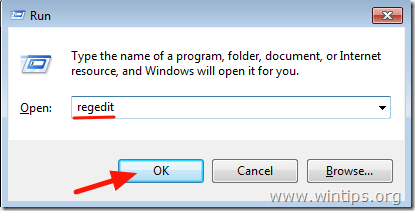
If online activation fails, Windows can be activated by phone. Choose Activate by Phone from the activation options, or type slui 4 into the Run dialog. You must send an installation ID during phone activation, and Microsoft’s automated system will return a confirmation ID. For a full walkthrough, check our phone activation guide.

Advanced Fixes: SLMGR Commands, Clean Install, and Corrupted OS

If you’ve tried everything above and still see error 0xC004F050, it’s time for deeper fixes using the Command Prompt and, potentially, a clean installation, similar to the advanced methods covered in our dedicated Windows activation error 0xC004F050 troubleshooting guide.

SLMGR commands (run Command Prompt as Administrator):

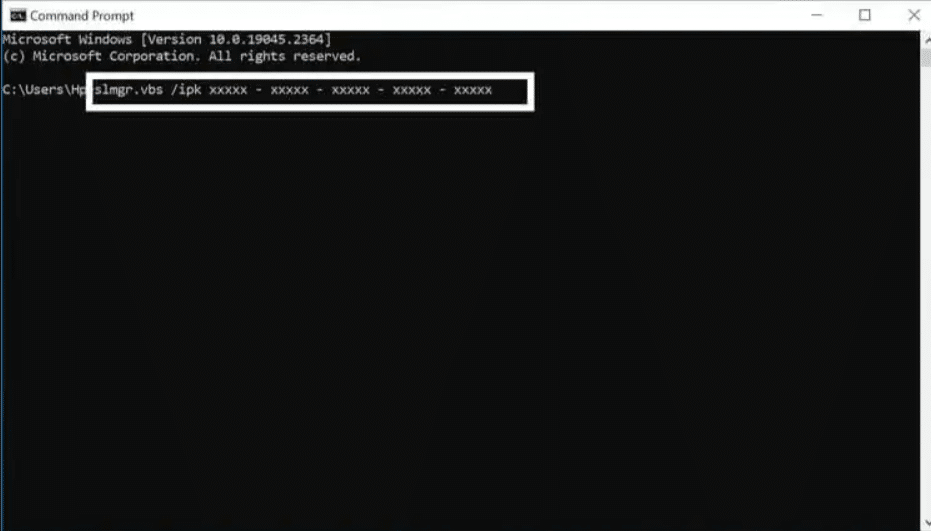
  1. Type slmgr.vbs /upk and press Enter – this will uninstall the current key.
  2. Type slmgr.vbs /ipk YOUR-PRODUCT-KEY and press Enter – this installs your new license key.
  3. Type slmgr.vbs /ato and press Enter – this forces online activation.

You can also type slui in the Run dialog to open the activation UI directly. To activate Windows using Command Prompt, run these commands carefully and only use keys you legally own.

Test with a new user profile:

Persistent errors can stem from profile corruption. Create a new local administrator account, sign in, and attempt activation from that profile. If it works, the issue was specific to the earlier versions of your user profile data.

When to perform a clean install:

  • Repeated failed Pro upgrades after trying the generic key method
  • System instability or corrupted OS files
  • Major version transitions (for example, upgrading old Windows 10 builds to new Windows 11 Pro)

Back up your data first, then use the Microsoft Media Creation Tool or a Windows 10 to Windows 11 ISO upgrade to create official installation media. Select the correct edition (Home vs. Pro) during setup. If your windows license is a digital license linked to your account, skip entering a key during setup-Windows should automatically activate after the fresh install completes and you sign in. If it’s a retail key, enter it when prompted.

If you’re uncomfortable with command-line tools or rebooting into a clean install, reach out to Indigo Software’s US-based support team. We can guide you step-by-step via email or remote session.

When You Need a New Key (and How Indigo Software Can Help)

Sometimes error 0xC004F050 genuinely means the key is done. This is common with ultra-cheap keys from auction sites and unauthorized marketplaces.

Replace your key if:

  • Microsoft reports the key as blocked or invalid after verify attempts
  • The key has been activated on multiple PCs by a previous owner
  • The seller can’t provide traceable proof of purchase from an authorized Microsoft channel

Indigo Software is a veteran- and family-owned Texas business specializing in genuine Microsoft software at discounted prices, including Windows and Office licenses. Every key comes with a lifetime guarantee, instant delivery, and activation support included-no subscriptions, just a one-time purchase.

Already purchased from us and still seeing the error? Contact our Indigo Software support team with your order number. We’ll validate the key, check the edition match, and provide a working solution at no additional cost.

FAQs About Windows Activation Error 0xC004F050

Can I fix error 0xC004F050 after replacing my motherboard?

Yes-if your license is retail or a digital license linked to your microsoft account. Use the Activation troubleshooter’s “I changed hardware on this device recently” option to reassign it. OEM keys tied to the original motherboard generally cannot transfer.

Should I use a generic key to activate Windows permanently?

No. Generic keys only switch your edition (for example, Home to Pro). They will not permanently activate your system. After the edition change completes, you must enter a valid retail or volume key to remove the “Activate Windows” watermark and complete the activation process.

If none of the fixes above resolve error code 0xC004F050, our team at Indigo Software is ready to help. Browse our full Windows catalog, log in to your Indigo Software account, or reach out directly-we’ll diagnose your license and get you activated.

Does error 0xC004F050 mean my Windows product key is fake?

Not necessarily. While non-genuine windows keys are a frequent cause, the error code also fires on edition mismatches, hardware changes, server delays, and simple typos. For more background on our licenses and support policies, see the Indigo Software FAQ and troubleshooting guidance. Check your edition and key type before assuming the worst.


Discover more from Indigo Software

Subscribe to get the latest posts sent to your email.

Don't take our word for it

Purchased software from Indigo a couple times over the years. Everything installs as it should and is the legit software. Anytime I've had a question or needed help, they IMMEDIATELY replied to emails with guidance or a... quick fix. I'll definitely keep using them for future software needsread more
Shaun KShaun K
22:38 10 Nov 25
I got some really good help from Jessi at the Indigio Software help desk recently. I had lost several apps/programs last week that I couldn't recover and one I'd had for a while that I really needed to get back in... rebuilding my system tools on my Windows PC.Office Professional 2019 that I had downloaded from Indigo software years ago at a great price had everything I needed along with a license to have the product on any one working PC ....now Windows 11...but I required some help as my purchase history info and key info were needed to get me another 2019 download and they were with my lost files somewhere.Anyway Jessi looked at some history and found me in their database. He took care of getting me the information I needed with suggestions to help the process go smooth. Replies were quick and information was very helpful.Great company great people great support... especially when you need it!read more
John HunterJohn Hunter
00:17 28 Oct 25
I purchased MS Office 2019 from Indigo a few years ago. Since then, my wife, son and grandson have purchased 2019, as well. This week, thanks to Microsoft updating Windows, I was unable to use any of the Office... programs. I even tried to restore my computer to before the update, with no effect. I called the Indigo Help Desk and Jessie was incredible as she patiently worked with me for over an hour. Finally, she sent me a new product code so I could reinstall the program. The problem was no fault of Indigo, but they solved my problem. An outstanding example of customer care. I highly recommend Indigo for Microsoft software at Great prices.read more
Victor GregorieVictor Gregorie
03:55 06 Sep 25
I've made multiple purchases from Indigo Software over the years. I've found them very competitive from the price standpoint, with a quick clear distribution for licensing. Recently after a hardware upgrade, one of my... licence keys stopped working. Indigo solved my problem promptly, with excellent friendly communication. I highly recommend them and will use them again.read more
Joe SeileyJoe Seiley
23:24 17 Aug 25
Best customer service ever!! their tech called me after hours to solve an issue, was generous with his time and patient and gave his all. He called again first thing in the morning to ensure it was all resolved even... before my day started so I didn't miss a single day of work. I have not found yet any company to provide this level of service, even more than a year after the purchase. Highly highly highly recommended! Thank you guys.read more
adad Vanunuadad Vanunu
14:45 25 Jun 25
Indigo Software is a great place to go for software at a reasonable price. Their customer service is top notch and I highly recommend them to anyone.
Dave KesterDave Kester
15:56 05 Sep 24
Great company for purchasing software at a very reasonable price. They provided me with excellent support getting the apps I purchased from them transferred to my new computer.
Betty AllmanBetty Allman
20:29 03 Sep 24
I always go to Indigo SoftwRe for my Microsoft Office purchases, I haven't found a better price anywhere. What I didn't know is that they have awesome customer service. I had an issue with my computer and needed to... reinstall my software. I wasn't sure how to do that so I reached out to Indigo. They quickly responded with a video which provided a simple solution. I was back to work in minutes. Thank you Indigo for simplifying my life!read more
debdeb
00:01 24 Aug 24
I needed the Microsoft Office program on my Mac. When I purchased Indigo's product, I had several issues downloading and installing the program. However, when I reached out to the good people at Indigo, they went... above and beyond in helping me through all the steps needed in order to get the program up and running. I am beyond pleased with their expertise, knowledge, and the constant reaching out to me during the process! I've not seen a company care so much about their customers. Refreshing to see such professionalism! I would definitely recommend them for their products and services! Five stars to Indigo!read more
Melanie KoehlerMelanie Koehler
21:33 16 Aug 24
Indigo is incredible!!! They have genuine Microsoft Suite products at a fraction of the price. In addition, the customer service is top notch!! Highly recommend!!!
Jack BerkJack Berk
20:25 20 Jun 24
Indigio Software company is a company I continuously return to. Customer Service is great and the product pricing is awesome. This is a veteran owned/run company and I believe in supporting whenever possible those who... serve and have served to give us the Freedoms we love and hold dear. Thank you Indigo Software company. I refer anyone who wants a company that truley cares about their customers and want to support veterans!read more
Suzanne EllisSuzanne Ellis
18:54 18 Jun 24
I’m thankful I found Indigo Software. Over the last few years, I’ve purchased their Microsoft Office Professional software suite for three different home computers. I don't understand why everyone does not purchase... their Microsoft Office programs thru Indigo Software. They are economical and provide great, responsive Customer Service!read more
Russ PilcherRuss Pilcher
13:59 07 May 24
I purchased a couple of licenses for Windows 10 over the years and 1 license for Office Pro 2019. I dumped one of my older laptops where Office Pro 2019 was installed and purchased a new laptop. Unfortunately, I... could not activate the Office Pro 2019 on my new laptop. I reached out to Indigo and they provided me a new legitimate activation code which I successfully registered in my Microsoft online account. I was then able to re-install on my new laptop without issue and fully activated and recognized as legitimate MS software.read more
John BensonJohn Benson
02:55 25 Apr 24
They have amazing customer service. I accidentally ordered the wrong item and then email them about my mistake. They were very quick to cancel my original order and refund the cost so I could easily order what I... actually wanted. The refund credited quickly to my credit card so there was no financial impact or delay.They have an excellent video to a company the order which made it very simple and easy to download and install.I am so happy to see that there are companies out there that still know what true customer service is.read more
elikaelika
17:14 31 Jan 24
I purchased Office from Indigo some time ago, but in the aftermath of upgrading my PC's CPU and upgrading to Windows 11, the license was lost/deleted/corrupted/removed and my Office was deemed an unlicensed copy (with... the corresponding warnings from Microsoft.) The Team Indigo Helpdesk was (unlike some other "helpdesks") very helpful, resolving my issues promptly, even on a weekend. One may purchase productivity software from many sources, but they stand behind their service. Thank you Indigo. I feel comfortable in recommending your service to anyone at any time.read more
Sid WoodSid Wood
18:01 28 Jan 24
I've dealt with several software vendors in the past, but I can truly say that Indigo has exceeded my expectations. Not only are the prices fantastic (for LEGITIMATE Sftwr and Keys), but the response, and follow-up are... amazing. I purchased software on behalf of a non-profit, and they handled the tax-exempt status without any issue. Then when I bought Software for myself, somehow my email was 'linked' to that non-profit entity. Indigo responded incredibly fast and cleared it up. All this, while providing valid keys which activated without issue.I'm very happy with Indigo Software and will continue to use them as a valuable Software resource!read more
Tbne3618Tbne3618
14:14 28 Jan 24
I am a Veteran disabled from a stroke , and built a New pc as therapy for my hand from components given to me as a gift, however I was having issues with my fresh new windows 10 Pro. Install and activation, 2 days... working on the issue ,and After hours on the phone with Microsoft support ,even they could not Resolve the Issue. I came upon the Indigo software website by accident. And thought I would send an email with my dilemma. It was late here on the east coast. I was very surprised in less than 1 hour I had received an email. With some instructions as to what I should look for. Emailed back a few screenshots of the errors. And 2 emails later. Within 1 hour . I was fully up and running. Issue was resolved. Not sure if I should mention a name, but I want to thank Michael of the Team Indigo Software Helpdesk ,,and company for resolving the issue. I highly recommend Indigo software for your Microsoft software needs. And their support is beyond fantastic. Please. Support this company. You cannot go wrong.Veteran owned business.Semper FiNeal Newmanread more
Neal NewmanNeal Newman
18:09 23 Jan 24
We've been purchasing software for several years now and really appreciate the great service and quality of Indigo Software Company. Their prices are very affordable and we've never had an issue with any software we've... purchased. Look forward to another great year as our software needs arise!read more
Eagle Medical IncEagle Medical Inc
17:36 22 Jan 24
I could have bought Office 2021 from another company cheaper but didn't so glad I paid more had issues with download and the support from Joe and Jenna was awesome. You get what u pay for so spend the extra money and go... with Indigo. I've used multiple times and they have never let me down.read more
Herbert CumbaaHerbert Cumbaa
15:55 26 Jul 22
Outstanding! Fair Price for Product! (Office Professional Plus 2016) Received Install Codes Immediately after Purchase! Processed Perfectly with Microsoft! Wanted Legit Software for Our Church! Will Use Again!... A+A+A+A+A+A+A+A+A+A+A+read more
Allan DrakeAllan Drake
20:51 16 Jul 22
js_loader

US Veteran-Owned Operated Since 2016

Indigo Software was founded by a U.S. veteran. We believe in honest pricing, exceptional service, and standing behind every product we sell — values instilled long before we started selling software.